


A URL redirect tells a browser that a web page has moved to a different URL. Instead of displaying an error page, the redirect automatically sends the visitor to the correct destination. Redirects help websites manage URL changes, preserve accessibility, and maintain SEO performance.
Think of it like filing a change-of-address form at the post office. When you move, your mail gets forwarded to your new address automatically. A URL redirect works the same way. When a page moves, it tells browsers and search engines where to go instead.
Part of helping law firms get found online is creating a technically sound website. You might use redirects during website rebuilds, domain migrations, HTTPS upgrades, and content restructuring. When used correctly, they help preserve SEO value and prevent broken links. When used incorrectly, you’re left with broken links and, most likely, lost rankings.
This guide provides a high-level overview of every type of redirect, when to use each, and how to implement them.
Understanding How URL Redirects Work
When you enter a URL or click a link, the browser requests that page from the server. If the server contains a redirect rule, it points the browser to a different URL instead. The browser loads the new destination.
Redirects communicate through HTTP status codes. Those status codes tell browsers and search engines whether the redirect is permanent, temporary, or intended for a specific technical purpose. Search engines use these signals to understand how URLs relate to each other and how to handle ranking signals.
Use the wrong redirect type, and you risk confusing search engines, losing ranking signals, or pointing visitors to a broken page.
Server-Side URL Redirects Explained
URL redirects fall into two categories: server-side and client-side. The difference is where the redirect instruction is handled.
Server-side redirects are the standard approach for SEO. They provide clear instructions at the server level before the page starts loading, making them faster and more reliable for search engines like Googlebot to process.
301 Redirect: Permanent Redirect
A 301 redirect tells browsers and search engines that a URL has been permanently replaced by a new one. When someone visits the old URL, they are forwarded to the new one.
The “301” is the HTTP status code used for this type of redirect. Search engines treat a 301 redirect as permanent and transfer ranking signals and link equity to the new URL.
302 Redirect: Temporary Redirect
A 302 redirect tells browsers and search engines that a URL has been temporarily replaced by a different one. When someone visits the original URL, they are forwarded to a temporary destination instead.
Because a 302 redirect is temporary, search engines may continue ranking it while the redirect is in place.
307 Redirect: Temporary Redirect
A 307 redirect also indicates a URL is temporarily moved to a different location. But unlike a 302 redirect, a 307 redirect preserves the original request method.
When your browser communicates with a server, it uses different types of requests. A GET request asks for a page; it’s what happens when you click a link or type a URL. A POST request sends data; it’s what happens when you submit a form, log into an account, or complete a checkout.
When a 302 redirect fires, most browsers automatically switch to a GET request at the new URL, regardless of what was originally sent. For a standard content page, that’s fine. But if someone submitted a form and hit a 302, the browser might just fetch the new page instead of resubmitting their data, and that can cause you to miss form submissions, for example.
Say someone submits a contact form and your server has a 302 on that URL. In most cases, the form gets sent before any redirect. But in some cases, the browser will switch to a GET request at the new destination, and GET requests don’t carry form data. The submission vanishes and you don’t receive the user’s information. The user thinks it went through, but it didn’t.
A 307 prevents that switch. It tells the browser to repeat the same type of request at the new URL. POST goes in, POST comes out the other side.
For most websites, you’ll never need a 307. It’s generally needed only when you’re building web apps or APIs where form submissions and data requests need to survive a temporary redirect.
308 Redirect: Permanent Redirect
A 308 redirect indicates that a URL has been permanently moved to a new location. Search engines treat the destination as the new permanent URL and transfer ranking signals and link equity from the original, the same as a 301.
The difference is that a 308 also preserves the original request method, the same way a 307 does for temporary redirects.. You might need a 308 if you’re running a web application that relies on form submissions or API calls and needs a permanent redirect that won’t drop the data. But for most content websites, a 301 is the only permanent redirect you’ll ever need.
Client-Side URL Redirects Explained
Client-side redirects work differently from server-side ones. Instead of the server handling the redirect before the page loads, these redirects occur in the browser after the page has already started loading. That extra step makes them slower and less predictable for SEO.
Meta Refresh Redirects
A meta refresh redirect lives in the page’s HTML rather than in the server configuration. The browser starts loading the page, reads the redirect instruction, and then navigates to the new URL.
You’ve probably seen the classic version of this: You will be redirected in 5 seconds. That’s a meta refresh. They’re slow, they’re clunky, and most modern sites have moved on from them.
JavaScript Redirects
JavaScript redirects use browser scripts to send visitors to a new URL after the page starts loading. Google can process many of them, but they’re less consistent than server-side redirects. If a server-side option is available, use it.
How to Implement URL Redirects (Step-by-Step)
How you create redirects depends on the platform and server configuration. Some websites use server configuration files, while others use:
- Content management systems (CMS): Website platforms such as WordPress allow users to create and manage website content through an administrative dashboard.
- Hosting platforms: Services that store website files and make websites accessible on the internet. Some include built-in redirect management tools.
- CDN services: Platforms such as Cloudflare that can manage redirects before visitors reach the website’s main server.
The following is a basic overview. For more detailed information, see our step-by-step guide for implementing redirects.
Redirects in Apache (.htaccess)
Apache servers handle redirects through a file called .htaccess. You add redirect rules directly to that file. For example:
Redirect 301 /old-page/ https://example.com/new-page/
This creates a permanent redirect from /old-page/ to https://example.com/new-page/.
Redirects in Nginx
Nginx handles redirects through its server configuration files. You add rewrite rules to control how URLs are forwarded. For example:
For example:
rewrite ^/old-page/$ https://example.com/new-page/ permanent;
This rule permanently redirects visitors from /old-page/ to https://example.com/new-page/. The word permanent tells Nginx to use a permanent redirect instead of a temporary redirect.
Redirects in WordPress, Cloudflare, and Website Platforms
If you’d rather skip the config files, most CMS platforms and hosting tools offer built-in tools or plugins to manage redirects.
WordPress websites commonly use redirect plugins such as Redirection, Rank Math, or Yoast SEO Premium. Platforms such as Cloudflare provide dashboard-based redirect tools.
In most cases, website owners enter:
- The original URL
- The destination URL
- The redirect type
After you save or publish, visitors requesting the old URL are forwarded to the new destination.
Common Redirect Mistakes and How to Avoid Them
Most redirect problems trace back to unnecessary complexity, inconsistent rules, or the wrong redirect type for the situation. Here are some common mistakes to watch out for.
Redirect Chains
A redirect chain occurs when a URL redirects to another URL, which then redirects to another URL, and so on. For example:
Page A → Page B → Page C → Page D
The browser and search engine have to follow multiple hops before reaching the final page. Redirect chains slow page loading and waste crawl budget (the amount of time and resources search engines spend).
You can identify redirect chains using crawling tools such as:
When you find redirect chains, update the original URL to point directly to the final destination, cutting out the middle stops.
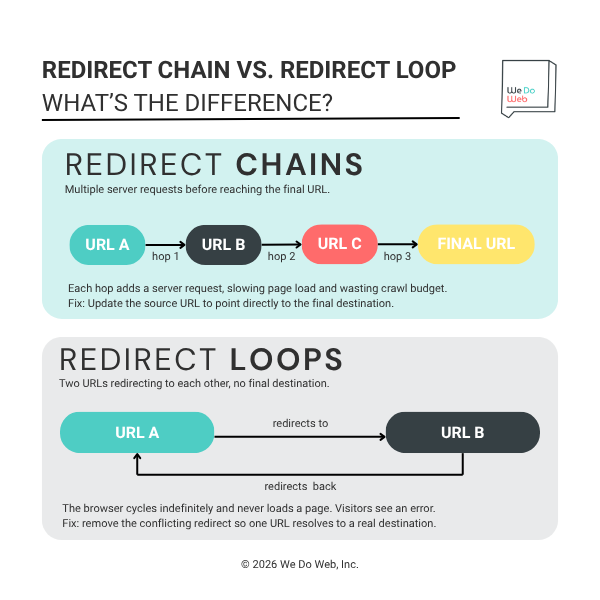
A graphic illustrating the difference between redirect chains and redirect loops.
Redirect Loops
A redirect loop occurs when two or more URLs continuously redirect back to each other and never reach a final destination. For example:
Page A → Page B → Page A
Visitors may see browser errors such as “too many redirects” or “redirect loop detected.” Redirect loops could be the result of:
- Conflicting redirect rules
- Incorrect server settings
- Multiple plugins attempting to manage the same redirects
- HTTP and HTTPS redirects conflicting with each other
Crawl tools and browser error messages are usually the fastest way to spot redirect loops. Fixing them usually requires reviewing and removing conflicting redirect rules so the browser can reach a final destination page successfully.
Not Updating Internal Links After Redirecting
After setting up a redirect, update your internal links to point directly to the new URL. Navigation menus, blog posts, buttons, and footer links pointing to redirected URLs create unnecessary extra steps for browsers and search engines.
You can identify old internal links with website crawling tools such as:
- Screaming Frog
- Sitebulb
- Ahrefs Site Audit
Once identified, update the links so they point to the final URL.
Redirecting All Pages to the Homepage
Some websites redirect every outdated or deleted URL to the homepage. This may seem simpler, but search engines may treat these redirects as soft 404 errors because the destination page doesn’t match the original content.
For example, redirecting an old blog article to the homepage may create a poor user experience because it leads visitors to content unrelated to their original request.
Wherever possible, redirect the old URL to its closest equivalent page.
How to Audit and Monitor Your Redirects
Setting up redirects is only part of the job. Regular audits catch broken redirects, redirect chains or loops, outdated links, and crawl issues before they affect your rankings.
Using Google Search Console
Google Search Console helps website owners monitor how Google crawls and indexes redirected URLs. The Coverage report, also known as the Page Indexing report, can identify redirect errors, soft 404s, and pages that aren’t being indexed because of redirect issues.
The URL Inspection Tool tests individual URLs to verify how Googlebot processes a redirect, including whether Google recognizes the intended destination.
Using Screaming Frog and Other Crawl Tools
Crawl tools like Screaming Frog, Sitebulb, and Ahrefs Site Audit scan your site and flag redirect chains, loops, broken redirects, and 404 errors. After a crawl, they create a report showing which URLs are redirecting, where they lead, and what needs attention.
Free Online Redirect Checkers
Free online redirect checkers test individual URLs and show how redirects behave in real time. Popular tools include:
These tools display important information such as the HTTP status code, the full redirect path, the final destination URL, and how many hops it took to get there. Redirect checker tools are useful for identifying redirect chains, loops, incorrect redirect types, and broken redirects.
Redirects Are a Superpower, but Use Them Wisely
Redirects become much easier to manage once you understand the difference between permanent and temporary URL changes. A strong redirect strategy starts with a few best practices:
- Determine whether the URL change is permanent or temporary.
- Use a 301 for permanent URL changes.
- Use a 302 or 307 for temporary URL changes.
- Keep redirect paths as direct as possible (avoid chains and loops)
- Regularly check for problems with redirects.
Redirects are a foundational part of managing any website. When set up correctly, they’re invisible. But when set up incorrectly, they can tank your search performance.
