


A 301 redirect is a permanent redirect. It tells browsers and search engines that a URL has moved to a new location for good and that the original URL is done.
Why Get 301 Redirects Right?
It’s easy to overlook redirect mistakes, and most will go unnoticed, at least at first. But a bad 301, or using a 302 redirect when you should use a 301, can create real harm:
- Ranking signals fragment across the old URL and the new one
- The wrong page stays indexed while your target page struggles to gain traction
- Ranking signals never consolidate where you intend
- Redirect chains stack up as the site grows or goes through structural changes
This guide is for SEO professionals, web developers, and site owners who want to understand 301 redirects at a level that goes beyond the fundamentals of redirects. It’ll walk through how 301s work, when to use them, how to implement them, and how to troubleshoot problems. It’ll also explain 301s’ impact on SEO and answer several common questions about 301s.
How a 301 Redirect Works
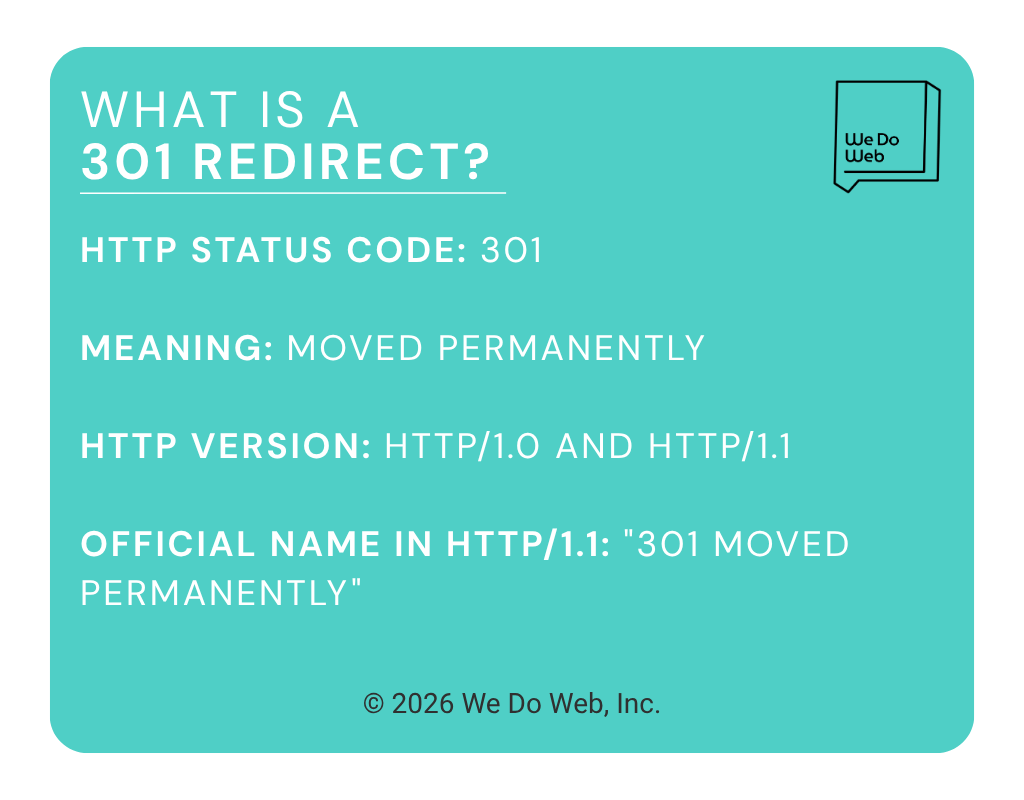
The 301 status code means “Moved Permanently.” It tells the browser that the requested resource has a new, permanent home. The key technical details are:
- HTTP Status Code: 301
- Meaning: Moved Permanently
- HTTP version:
HTTP/1.0andHTTP/1.1 - Official name in HTTP/1.1: “301 Moved Permanently”
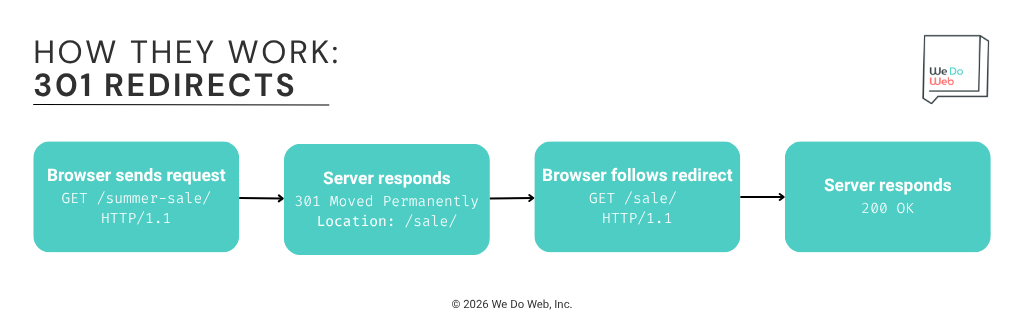
The redirect itself works the same way any redirect does:
- Browser sends a
GETrequest to the original URL (e.g., https://example.com/old-page/) - Server responds with 301 and a
Locationheader pointing to the new destination - Browser follows the redirect and requests the new URL
- Server responds with
200 OKand serves the page content
The raw HTTP response header looks like this:
HTTP/1.1 301 Moved Permanently
Location: https://example.com/new-page/
Content-Type: text/html
When to Use a 301 Redirect
A 301 covers a wide range of common website changes. Outside of genuinely temporary scenarios, it’s almost always the right redirect to use.
Site Migrations and Domain Changes
Moving your entire site to a new domain is one of the highest-stakes redirect scenarios in SEO. A migration without proper 301 mapping can unravel rankings that took years to build.
Example: Your firm rebrands from smithlawgroup.com to smithandpartners.com. Every old URL should have a direct 301 redirect to its closest equivalent on the new domain. The old domain is gone permanently, so you want Google to move all the authority, link equity, and indexing from the old URLs to the new ones.
A few things to nail before and after:
- Map every old URL to its corresponding new URL before implementing anything
- Direct individual pages to their matching destinations, not everything to the homepage (more on that below)
- Keep the old domain’s redirects active for at least 12 months post-migration
- Watch Google Search Console closely for crawl errors in the weeks after launch
HTTPS Upgrades
Every site still serving pages over HTTP should redirect those URLs to their HTTPS equivalents. HTTP is gone and it’s not coming back, which makes using a 301 redirect the correct choice.
Example: http://example.com/practice-areas/ redirects permanently to https://example.com/practice-areas/.
A few common mistakes to avoid:
- Redirecting at the domain level only, without explicit redirects on individual pages
- Leaving HTTP internal links in place after the migration (every one of them becomes an unnecessary redirect hop)
- Forgetting to update canonical tags to the HTTPS versions
URL Structure Reorganization
When you restructure your site’s URL architecture, such as flattening deep paths, renaming slugs, reorganizing sections of your website, add a 301 redirect to every URL you’ve updated.
Example: You move your blog from /blog/category/post-title/ to /blog/post-title/. Each old URL needs a 301 pointing to its new home.
Before restructuring, pull your backlink profile. The pages with the most external links pointing at them deserve the most careful 301 mapping. Ahrefs allows you to quickly review your highest-value backlinks so you can identify the pages to prioritize.
Consolidating Duplicate or Overlapping Pages
Sites accumulate duplicate pages over time, such as multiple URLs covering the same topic, old location pages that never got cleaned up, and outdated versions of practice area content.
Example: You have /car-accident-lawyer/, /car-accident-attorney/, and /auto-accident-lawyer/ pages all targeting the same service. You consolidate them into a single authoritative page, choose the strongest URL of the bunch, and 301 redirect the others to it.
The 301s pull the link equity and ranking signals from the retired pages into one stronger URL rather than splitting them across three weaker ones.
How to Implement a 301 Redirect
This part of the article walks through how to code and configure 301 redirects on some of the most common platforms. For a full step-by-step walkthrough covering all redirect types, see our complete redirect implementation guide.
Apache (.htaccess) 301 Redirect
For a single-page permanent redirect in Apache, add this to your .htaccess file:
Redirect 301 /old-page/ https://www.example.com/new-page/
Apache defaults to a 302 when no status code is specified, so always explicitly specify a 301 redirect for permanent URL changes.
# Explicit 301 for a single page
Redirect 301 /old-practice-area/ https://www.example.com/new-practice-area/

# Pattern-based 301 (redirect an entire folder permanently)
RedirectMatch 301 ^/old-section/(.*) https://www.example.com/new-section/$1
Common Apache 301 mistakes:
- Omitting the status code. Apache defaults to 302, so leaving it out means you’re implementing the wrong redirect type
- Using
RedirectMatchpatterns that are too broad and pull in URLs you didn’t intend to redirect - Stacking conflicting rules that create chains
Nginx 301 Redirect
In your Nginx server block, use the return directive with the 301 status code:
# Single-page 301 redirect
location = /old-page/ {
    return 301 https://www.example.com/new-page/;
}

# Domain-level 301 (redirect all HTTP to HTTPS)
server {
    listen 80;
    server_name example.com www.example.com;
    return 301 https://www.example.com$request_uri;
}
Test the configuration before reloading Nginx:
sudo nginx -t
sudo systemctl reload nginx
WordPress 301 Redirect
The easiest way to add 301 redirects in WordPress is with the Redirection plugin. Follow these steps:
- Go to Tools > Redirection
- Enter the old URL path in the source field (e.g., /old-practice-area/)
- Enter the destination URL (e.g., https://www.example.com/new-practice-area/)
- Confirm the redirect type is 301 – Moved Permanently (the plugin’s default)
- Save
The Redirection plugin uses 301 redirects by default, which is appropriate for most permanent URL changes. Only adjust the redirect type if you have a specific reason to use a temporary redirect.
Using functions.php (for developers):
function my_permanent_redirect() {
    if ( is_page( 'old-practice-area' ) ) {
        wp_redirect( home_url( '/new-practice-area/' ), 301 );
        exit;
    }
}

add_action( 'template_redirect', 'my_permanent_redirect' );
The 301 parameter is the status code. Swap it for 302 when you need a temporary redirect.
Cloudflare 301 Redirect
Add a Redirect Rule to Cloudflare by following these steps:
- Go to Rules > Redirect Rules
- Create a new rule
- Set the condition (e.g.,
URI pathequals /old-page/) - Set the response type to 301 Permanent Redirect
- Set the destination URL
Cloudflare’s Bulk Redirects default to 301, making them well-suited for large-scale URL migrations. Verify the status code in your redirect list settings before deploying at scale.
Confirm Your 301 Is Working
After implementing a 301, verify it before you move on to the next URL. Curl gives you the fastest check:
curl -I https://www.example.com/new-page/
Look for 301 Moved Permanently in the response, along with a Location header pointing to the correct destination. If curl shows a 302, or the destination doesn’t match, fix it now rather than after Google has crawled it.
For a full walkthrough on detecting and auditing redirects across your entire site, see our rundown on implementing redirects.
Common Mistakes When Implementing 301 Redirects
- Redirecting everything to the homepage during a migration. Funneling all old URLs to the homepage prevents Google from consolidating the ranking signals associated with each page. Map individual URLs to their closest matching destinations.
- Creating redirect chains. A redirect chain is what happens when a URL redirects through multiple hops:
/old-page/ > 301 > /interim-page/ > 301 > /final-page/Each hop slows crawling and could cause the final page to load more slowly. Update the original redirect to point directly to the final destination:/old-page/ > 301 > /final-page/ - Removing 301 redirects too soon. External links pointing to the old URL will continue to arrive indefinitely. If you remove a 301 redirect prematurely, those inbound links hit a 404. Keep 301 redirects active for at least 12 months, and longer if the old URL has a lot of backlinks pointing to it.
- Skipping internal link cleanup. A 301 is good for redirecting external traffic arriving to your site via backlinks, but it is not a substitute for updating internal links. Every internal link pointing to a redirected URL causes Googlebot to make an unnecessary hop. After implementing 301s, audit your internal links and update them to point directly to the new URLs.
How a 301 Affects SEO
Link Equity and PageRank Transfer
The 301 is the standard mechanism for transferring link equity from one URL to another. When you retire a URL with a 301, the ranking signals built up at the old URL, like backlinks and internal links, flow to the new URL.
For much of SEO’s history, the conventional wisdom was that 301 redirects passed somewhere between 85 and 99 percent of link equity, with a small amount lost in the transfer. That became common industry-wide guidance, but Google hadn’t exactly confirmed a specific percentage. In 2013, Matt Cutts said that the amount of PageRank lost with a 301 was the same as that lost through any other link.
In 2016, Google’s Gary Illyes clarified that 30X redirects (including 301 and 302 redirects) no longer lose PageRank, which John Mueller confirmed shortly after.
30x redirects don’t lose PageRank anymore.
— Gary 鯨理/경리 Illyes (so official, trust me) (@methode) July 26, 2016
The practical guidance is:
- A 301 is the most reliable mechanism for consolidating link equity at a new URL.
- Expect signal consolidation to take time as Google crawls, processes, and transfers signals to the new URL.
- After implementing redirects, monitor Google Search Console to verify that the destination URL is being indexed, redirects are working as expected, and rankings are stabilizing.
Crawl Budget and Indexation
Once Google recognizes a 301 and updates its index, it typically stops crawling the old URL, which is more efficient than the behavior around 302s, where Google may continue crawling both the old and the new (temporary) URL.
For large-scale migrations with thousands of redirected URLs, it can take weeks for Google to fully process all the signals. Redirect chains compound that by requiring Googlebot to follow additional hops before reaching the final destination.
Use the URL Inspection Tool in Google Search Console to check how Google processes specific redirected URLs. If an old URL is still appearing as indexed weeks after a 301, you may be looking at a crawl delay or a competing canonical signal somewhere on the site.
Frequently Asked Questions (FAQ)
Does a 301 redirect fully pass link equity?
The 301 is your best option for transferring link equity from one URL to another. In 2016, Google’s Gary Illyes said that 30x redirects no longer lose PageRank. That said, Google still needs time to crawl and process the redirected URLs before signals are fully consolidated. A direct 301 to the final destination is preferred because it reduces latency, avoids unnecessary redirect hops, and simplifies crawling.
How long should I keep a 301 redirect active?
If there are backlinks pointing to the old URL, keep the 301 active at least 12 months, and longer for any URL with significant backlink equity or traffic. External links from other sites will keep pointing to the old URL indefinitely. Pull a 301 too soon and those links hit a 404. For high-authority pages, leaving the redirect active permanently costs nothing and protects against future link loss.
Will a 301 redirect hurt my rankings?
A well-implemented 301 redirect should not hurt long-term rankings. Expect some fluctuation while Google re-processes and re-indexes the redirected URL, but rankings typically stabilize at the final URL within a few weeks to a few months. The bigger risk is a bad implementation: wrong destination, a redirect chain, or a 302 used where a 301 was needed.
Can I use a 301 for a temporary change?
A 302 is the right tool when the original URL is coming back. Implementing a 301 and then reversing it later means Google has to re-process the change and restore the original URL’s indexing. It’s possible, but slower than if you had used a 302 from the start.
What happens if I have a chain of 301 redirects?
Redirect chains increase latency, create unnecessary crawl overhead, and can slow signal consolidation. While Google has said that 30x redirects no longer lose PageRank, a direct redirect to the final destination is still considered best practice because it is more efficient and less likely to cause crawling or indexing issues. Screaming Frog’s Redirect Chains report is one of the fastest ways to identify and fix them.
Should I use a 301 or 302 for an HTTP-to-HTTPS migration?
Always use a 301. The HTTP version of your site is gone permanently. A 302 here would signal to Google that HTTP URLs are still the primary version of your pages, which is the opposite of what you want. Use 301s across the board and confirm your HTTPS pages have canonical tags pointing to the HTTPS versions.
Summary: 301 Redirect Best Practices
A 301 redirect is the standard method for permanently moving a URL while preserving as much SEO value as possible. Use it for any permanent URL change, implement it cleanly, and protect the ranking signals you’ve built.
- Use a 301 when the original URL is never coming back
- Google consolidates ranking signals at the destination URL after a 301 redirect, but the process takes time
- Map each old URL to its closest relevant replacement
- Fix redirect chains; a direct 301 to the final URL uses less crawl budget than a chain
- Keep 301 redirects active for at least 12 months, longer if the old URL had a lot of backlinks
- Update internal links after implementing 301s; the redirect is good for handling external backlinks and traffic, but internal links should point directly to the new URL
- When in doubt, use a 301; a 302 on a permanent change leaves SEO signals ambiguous