


We get a lot of questions about redirects. When to use them, which type to set up, how long to keep them. We’ve put together a few resources to help answer those questions. This one tackles a step that people often skip: determining whether a redirect is needed in the first place.
Most of the time, the answer is no. The majority of URLs people want to redirect have little to no organic traffic and no backlinks worth saving. When there’s nothing of value attached to the old URL, a redirect doesn’t accomplish anything. It just adds a rule you’ll eventually forget about.
Before you set one up, pull the page in your analytics and a backlink tool. Two minutes of checking can save you from creating a redirect that does nothing.
Free Tool: Answer a Few Questions to Decide If You Need to Redirect
Use a redirect when there’s genuine value to preserve, and the old page’s history will help the new one. When there’s nothing to save, fix the link at the source if you can. And when the old page’s history is a liability, you don’t need a redirect.
This tool can help you decide whether to add a redirect, and which to add, for any given page:
Do I need a redirect? An interactive quiz.
Keep reading for more detailed information about the utility and necessity of redirects.
Ask These Questions Before You Redirect
Is there anything worth saving?
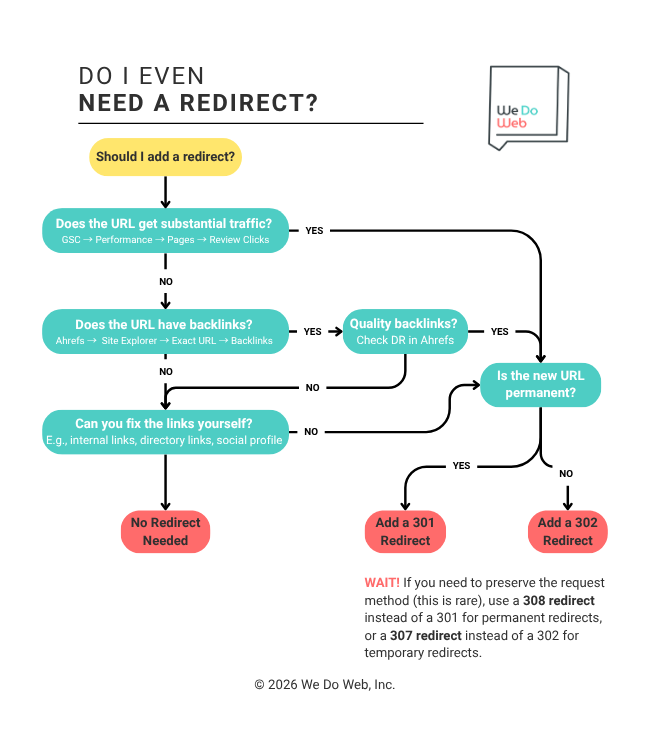
Check organic traffic and backlinks before you do anything. If the old URL gets no meaningful search traffic and has no links pointing to it, there’s nothing to preserve. Remove the page, let it return a 404, and move on.
Can you just fix the link instead?
If a link pointing to the old URL exists somewhere you control, such as a directory listing, a social profile, or a partner site, update it to point directly to the new URL. Anyone who clicks it will go straight to the destination rather than detour through the old URL.
What does the anchor text look like?
The links pointing to the old page carry their anchor text along with them. If those anchors are topically aligned with the destination, that’s useful. If they’re off-topic or over-optimized, they can distort a clean page’s link profile. Worth a quick look before you redirect.
Where do the links come from?
Links from credible, relevant sites are worth absorbing. A backlink profile built on low-quality directories or spammy sources is a different story. Redirecting those links transfers them to your destination page. If all the links pointing to the page are of little to no value, let them die with the old URL.
Chart: Follow the Logic to See If the Old Page Needs a Redirect
More Resources on Redirects
New to redirects? Start with our beginner’s guide to URL redirects.
Not sure how to set up a redirect? We’ve got a step-by-step implementation guide for that too.
Want to learn more about the types of redirects? See our guide to 301 redirects and our guide to 302 redirects.
And if you’re feeling especially adventurous, there’s our complete guide to search engine optimization.