


Every redirect looks the same to a visitor. Click a link, land somewhere else. But four different HTTP status codes can dictate how that redirect works, and each one tells search engines something different about the old page and the new one.
Pick the wrong one, and you could lose the SEO value of the page you’re replacing, or leave Google guessing about whether the old URL is coming back.
Here’s what each type means, when to use it, and where 307 and 308 fit into a decision most people frame as just 301 vs. 302.
- 301 redirects tell search engines the original URL is gone for good. This is what most people mean when they say “redirect.” It transfers ranking signals to the new URL, and search engines typically replace the old URL in their index with the new one.
- 302 redirects tell search engines the original URL is coming back. The destination is a placeholder rather than a replacement. Search engines may keep the original URL indexed and treat the new destination as short-term.
- 307 redirects work like a 302, but it also preserves the original request method. If a browser sent a POST request, a 307 keeps it a POST instead of converting it to a GET on arrival.
- 308 redirects work like a 301, with the same method preservation as a 307. It’s the permanent option for situations where the request method needs to stay intact.
You’ll rarely use a 307 or 308 redirect. Most redirect decisions are between 301 and 302. The 307 and 308 redirects handle a narrower set of cases, most of which involve APIs, forms, or infrastructure rather than a standard page-to-page move.
Before you pick a redirect type, confirm you actually need one. Review the old page’s traffic, internal links, and backlinks first. If you’re not sure that step applies to you, our guide on deciding whether to redirect a page walks through the decision.
Differences Between 302 Redirects and 301 Redirects
The core difference between these two comes down to intent. A 301 tells Google, “Forget the old URL. The new one is the permanent home for this content.” A 302 tells Google, “Don’t forget the old URL. This move is temporary.”
Factor | 301 Redirect | 302 Redirect |
Signal to search engines | "This URL has permanently moved" | "This URL has temporarily moved" |
Indexing behavior | Search engines typically replace the old URL with the new URL in their index | Search engines may continue indexing the original URL |
Link equity (PageRank) transfer | Generally transfers to the new URL | May not transfer; original URL may retain link equity |
Original URL re-indexing | Search engines expect never to see the old URL as a primary page again | Search engines expect the original URL to return |
Typical cache duration | Search engines cache the redirect aggressively | Search engines may cache less aggressively |
In theory, a 302 signals a temporary move. Google preserves the original URL in its index and doesn’t transfer full link equity to the temporary destination.
In practice, Google’s handling is more complicated than a strict reading of the HTTP spec suggests. John Mueller, Search Advocate at Google, has stated that a 302 left in place for a long time can start getting treated more like a 301, with indexing and ranking signals consolidating toward the destination URL.
That behavior isn’t guaranteed, and the timeline for when Google makes that shift is unclear. Google can also reverse it if the original URL shows signs of activity again, and signals can end up split across both URLs during the transition.
Google’s official guidance says to use a 301 redirect when the redirect is permanent and a 302 only when you genuinely intend for the original URL to return. Don’t use a 302 as a lazy substitute for a 301.
The most common mistake is using a 302 for a permanent URL change. Since a 302 signals “temporary,” search engines can keep treating the original URL as the primary version, and ranking consolidation may never happen. The reverse mistake also causes problems because a 301 tells search engines the original URL is gone for good, so applying it to a move that’s temporary can get the original URL dropped from the index.
Apply this to common scenarios:
Scenario | Correct Redirect |
Moving a page to a new slug permanently | 301 |
Domain migration | 301 |
HTTPS upgrade | 301 |
A/B test redirecting 50% of traffic | 302 |
Maintenance page for 2 hours | 302 |
Seasonal promo page (returns next year) | 302 |
Geo-targeting visitors to a regional page | 302 |
Permanent content restructure | 301 |
The golden rule is if you are unsure whether the original URL will return, treat the move as permanent and use a 301. A misplaced 302 leaves your SEO signals ambiguous. A misplaced 301 for a page that returns is recoverable if you add the original URL back and update or remove the redirect.
When You Actually Need a 307 or 308 Redirect
For most website changes, the decision comes down to 301 vs. 302. But 307 and 308 solve a specific problem those two don’t: preserving the request method.
Why the request method needs protecting. If a visitor submits a form with a POST request and gets redirected with a 301 or 302, some browsers and servers will convert that POST into a GET on the new URL. That can drop form data or break a submission the user thought went through. A 307 or 308 keeps the method intact, so a POST stays a POST.
Where this comes up in practice. This isn’t a concern for a typical blog post or practice area page moving to a new slug. It shows up in situations like:
- API endpoint moves: If an API call sends data (POST/PUT) and hits a redirect, a 301/302 can strip that data and turn it into a blank GET at the new address.
- Load balancers/failover: When traffic gets rerouted to a different server for infrastructure reasons, not content reasons, the request needs to arrive unchanged.
- Framework defaults: Some frameworks (Next.js among them) issue a 307 or 308 automatically in certain setups, even when a developer expects a 301 or 302. It can catch people off guard if they’re not aware of the framework’s default.
307 vs. 308 follows the same logic as 302 vs. 301, just with method preservation built in. Use a 307 when the move is temporary and the method needs to stay intact. Use a 308 when the move is permanent and the method needs to stay intact.
The Redirect Decision
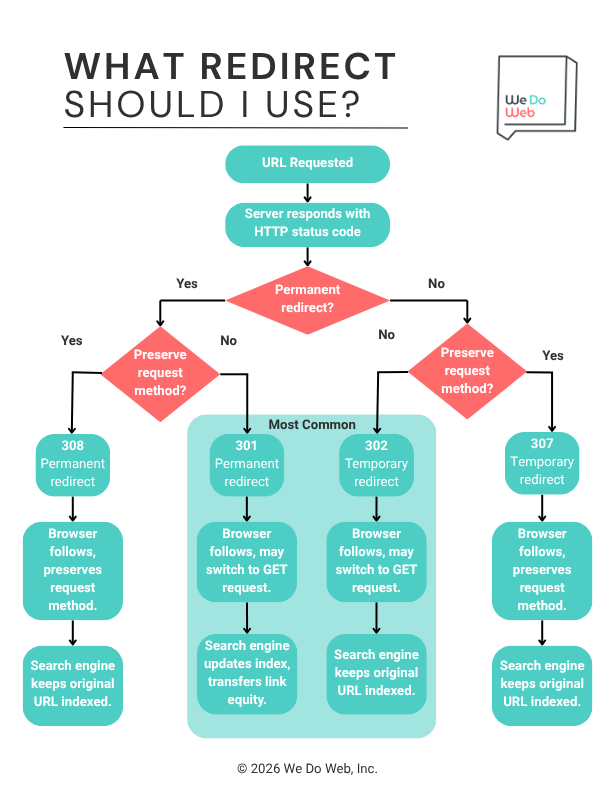
Once you know what each type does, the decision comes down to two questions: is the change permanent, and does the request method need to stay the same?
Running through those two questions covers nearly every redirect decision you’ll face on a website.
Here’s how that plays out.
More Resources on Redirects
If you’re a redirects novice, check out our beginner’s guide to URL redirection. And if you’ve never added a redirect yourself, we put together a step-by-step tutorial for adding redirects on some of the most common platforms.