


If you’ve heard the term SEO thrown around and still aren’t entirely sure what it actually does for a business, you’re in good company. Search engine optimization has been around since the mid-1990s, and it remains wildly misunderstood.
Part of the confusion is the name. “Search engine optimization” sounds technical, almost mechanical, like something you’d hand off to a developer and never think about again. “Do SEO to my website,” you might say, and voila, you’re ranking at the top of Google.
If only it were that easy. But SEO is not a black box either, nor is it ever a set-it-and-forget-it type of exercise. At its core, SEO is about understanding what people search for online and building a web presence that delivers that. When you get it right, Google rewards you with visibility. And when you ignore what searchers want, Google ignores you.
This guide covers SEO from the ground up: how search engines work, what earns visibility, the tools worth your time, and where SEO is heading. Whether you’re a law firm owner trying to figure out why your site isn’t generating leads, a marketer sharpening your fundamentals, or someone building an SEO skillset from scratch, we built this guide for you. Enjoy.
How to Use This Guide
This guide is for anyone trying to get a handle on SEO, whether you’re a marketer, a business owner, or just building your SEO knowledge. It’s especially useful for those looking to improve a business’s search presence and performance, particularly service businesses.
Most of the examples in this guide lean toward law firms, especially SEO related to personal injury firms. That’s the industry we know best, having spent more than 15 years doing SEO for attorneys. But the principles throughout the guide apply to just about any business trying to earn visibility in search.
Read it through if you want the full picture. SEO has many moving parts, and understanding how each piece connects helps you grasp the discipline as a whole. If you already have some background in SEO and you’re looking for something specific, the section headers will get you where you need to go. And if you’re ready to begin executing these tactics yourself, our SEO implementation guide can help.
What drives real results in SEO has always been the same: understand what your audience is searching for, produce content that answers those searches well, build a technically sound website that search engines can crawl and index, and earn a reputation across the web that signals you’re a source worth trusting. Everything in this guide connects back to those principles.
What Is SEO?
People talk about SEO constantly and define it differently every time. Before we get into how it works and what drives results, let’s make sure we’re starting from the same place.
The Simple Definition of SEO
SEO, or search engine optimization, is the practice of improving your website so that search engines surface it when people search for topics related to your business.
That definition is accurate, but incomplete. The fuller picture is this: SEO is about earning visibility. Search engines like Google exist to connect people with the best possible answer to their query. Your job is to build a website, establish a strong reputation across the web, and produce content that Google consistently identifies as that answer.
We’ve been doing this since 2008, and one thing has held true across every algorithm update: the sites that do well in search are the ones built to serve their audience well. That was true from our very first client, a disability law firm in South Florida, and it’s true now.
How Google decides which pages to surface involves a process called crawling, indexing, and ranking. We cover that in detail in the next section. For now, the short version is this: Google sends bots to discover your pages, stores what it finds, and uses hundreds of signals to decide which pages deserve to be seen in search results.
The Evolution of SEO
SEO has come quite a long way in the past three decades. For one, what was once a term describing a facet of search engine marketing is now accepted as a broader term used to describe all or most digital marketing.
Early SEO was a different game. In the late 1990s and early 2000s, ranking well was largely a matter of repetition. You stuffed your target keyword into a page as many times as you could, built as many links as possible regardless of where they came from, and Google’s relatively simple algorithms rewarded you for it.
It didn’t last, and it was never going to. Those tactics were built around fooling Google, and Google’s business depends on not being fooled. Its success is built upon earning users’ trust that its results are the best ones available.
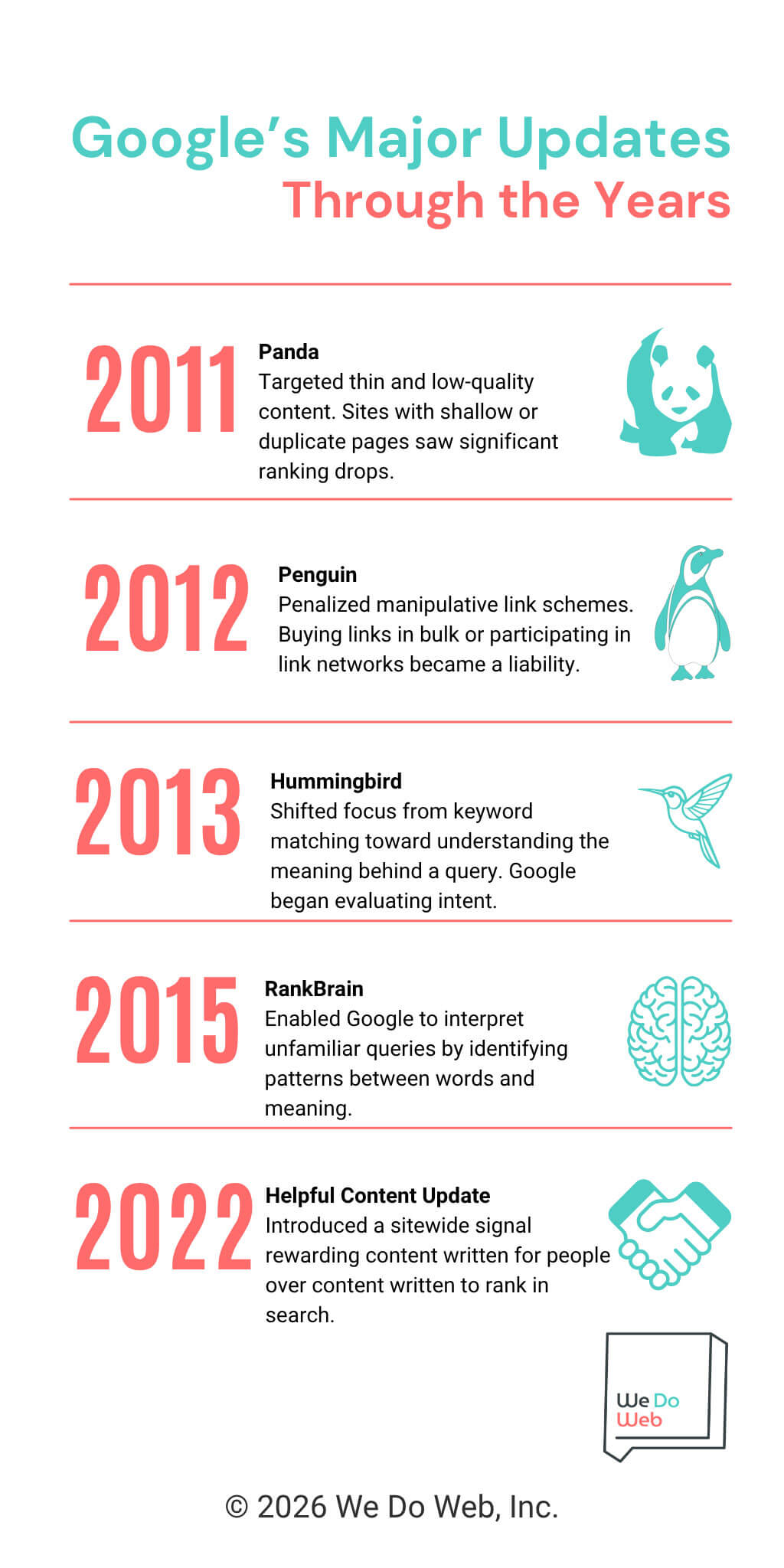
Google has spent the better part of two decades closing those loopholes. Major algorithm updates, including Panda in 2011, which targeted thin and low-quality content, and Penguin in 2012, which went after manipulative link schemes, systematically dismantled the shortcuts. Each update pushed SEO toward quality, relevance, and genuine usefulness to the reader.
Today, Google’s systems are sophisticated enough to evaluate whether your content actually serves the person searching. That’s why the foundational approach we built We Do Web around in 2008, starting with what the reader needs and building content around that, has held up while tactics built on manipulation have not.
When our founder, Yvette Valencia, started the agency, she spent weeks embedded with the disability law firm, interviewing attorneys and staff, mapping out the claimant’s experience, and building hundreds of pages of content designed around what that audience actually needed to know. There were no shortcuts or secret formulas.
That approach drove the firm from a few hundred monthly visits to 1,500 by the end of its second month, and to over 100 contact requests per month by December of that year. All that might sound quaint today, but in 2008, that was enormous online growth for a law firm with little to no web presence.
The tactics have evolved considerably since then. The underlying principle, though, has not.
SEO vs. SEM vs. PPC
These terms have a complicated history, and the way people use them today doesn’t always reflect their original meanings.
SEM (search engine marketing) started as the umbrella term covering everything you did to gain visibility through search engines, especially organic and paid. SEO (search engine optimization) was the organic piece. PPC (pay-per-click) was the paid piece.
Somewhere along the way, the terms and their definitions drifted. SEO started getting used loosely to describe the whole discipline, and SEM somehow became shorthand specifically for paid search (even the Wikipedia entry for SEM acknowledges it mostly refers to paid ads these days). Neither change was official. It just happened, and you’ll find both uses in the wild depending on who you’re talking to.
New terms have also entered the conversation. GEO (generative engine optimization) and AEO (answer engine optimization) both refer to strategies aimed at earning visibility in AI search experiences like Google’s AI Overviews and AI Mode, or in tools like ChatGPT and Perplexity.
But whether you’re talking about organic rankings, paid ads, or showing up in an AI Overview, the goal is the same: reach the right people, build enough trust that they choose you, and turn that visibility into new or repeat business. The channels and tactics evolve, but the core objectives do not.
Why SEO Is Important for Your Business
SEO gives you visibility in the place most people go when they need something, whether that’s a service provider, a local business, or an answer to an urgent question. Sitting it out means handing that visibility, and the clients that come with it, to whoever shows up in your place.
The Business Case for SEO

Click to enlarge
The core reason businesses invest in SEO is that it builds something lasting. Run a PPC campaign, and your visibility exists exactly as long as your budget does. The moment you stop paying, the traffic stops. SEO compounds in value over time. Every piece of content you publish, every link you earn, every technical improvement you make strengthens the foundation everything else is built on.
Here’s an example. A personal injury firm in Florida came to us with just a handful of signed cases from search each month. We fixed the technical foundation, overhauled the content, built links and authority, and kept optimizing. Year one, signed cases from search doubled. By year three, the firm was signing 4.4 times as many cases from search as when we started, with each year outperforming the last.
There’s a trust dimension here too. Organic rankings carry credibility that paid placements don’t. A searcher who finds your business at the top of organic results or in the map pack or in the AI Overview is encountering a signal that Google considers your page the most relevant answer to their query. That’s a better first impression than an ad can deliver.
Search Statistics for Businesses
You’ll run into all kinds of SEO statistics as you explore this space. Some come from solid research. Some don’t. And a fair number have circulated so long that nobody can trace where they originally came from. A few sources, though, are genuinely trusted across the industry. Together, they tell a story that lines up with what we see every day working in search.
First, Google still dominates. ChatGPT processes over two billion prompts per day, and many could classify as search-like queries. That’s narrowed the gap with Google’s 13.7 billion daily searches. And yet, according to Ahrefs, ChatGPT’s click-through rate is 96% lower than Google’s, and Google sends 190x more traffic to websites than ChatGPT.
Organic results still drive a lot of clicks. Backlinko’s user behavior research found that 65% of Google searchers click on at least one organic result during their search session, and only 0.44% ever visit the second page. Those two numbers together tell you where search opportunity lives.
The map pack is the primary click destination for many local searches. Backlinko found that 42% of people performing a local search click on a result inside the Google map pack, making it one of the most direct paths from search to contact for any business with a physical location.
AI Overviews are redistributing clicks, but the impact is concentrated on informational queries. Ahrefs’ analysis using December 2025 data found that the presence of an AI Overview correlates with a 58% lower click-through rate for the top-ranking page.
The connection between organic and AI is stronger than many assume. Ahrefs also found that 76% of AI Overview citations are pulled from pages ranking in Google’s top 10 organic results, which means strong organic rankings remain a clearest path to AI visibility too.
The through line across all of it is that strong organic rankings, a credible local presence, and content worth citing position a business for search in whatever form it takes.
Debunking a Few Common SEO Myths
A few misconceptions come up often enough that they’re worth addressing directly.
Myth: SEO is dead. This one resurfaces every few years, usually triggered by a major algorithm update or a new development in search technology. AI search has brought it back around again. SEO is not dead. It is evolving, as it always has. The firms that struggled through past shifts were the ones whose strategies depended on tactics rather than fundamentals. The ones built on content quality, technical health, and a credible web presence have adapted without losing ground.
Myth: SEO is a one-time task. Set it and forget it is not a strategy. Search is competitive, algorithms update, and your competitors are not standing still. SEO requires ongoing attention. That doesn’t mean constant overhaul, but it does mean regular monitoring, content updates, and adjustment.
Myth: SEO agencies can guarantee rankings. No one can guarantee a specific ranking on Google. Google itself says so. An agency that promises you the top spot for a given keyword is either overpromising or planning to use tactics that will eventually hurt your site. The right promise is a sound strategy, consistent execution, and transparent reporting on results. As you consider hiring an SEO agency, look for one that will offer honest assessments of your site and build a custom plan centered around your business.
How Search Engines Work
SEO strategy makes a lot more sense once you understand what’s happening under the hood. Here’s how Google finds, evaluates, and ranks the pages it shows in search results.
Crawling
Before any page can appear in search results, Google has to find it. That job falls to Googlebot, Google’s web crawler, which moves across the internet by following links from one page to the next.
Think of it like a series of roads and highways. Googlebot starts on well-trafficked roads and follows every link it finds to reach new destinations. If a page has no links pointing to it, from other pages on your site or from external sites, Googlebot may never reach it. This is one reason internal linking and earning links from other sites is so foundational to SEO.
Googlebot doesn’t crawl every page with equal frequency or depth. Google allocates what’s called a crawl budget to each site, roughly how much time and resources it’s willing to spend crawling your pages. Sites that update frequently, load quickly, and have clean internal structure tend to get crawled more efficiently. Slow sites or sites with significant duplicate content can burn through that budget on pages that don’t need it, leaving important pages absent from the crawl.
A sitemap submitted through Google Search Console helps Googlebot find your most important pages. Your robots.txt file, which controls which parts of your site crawlers can access, is worth reviewing too. A misconfigured robots.txt can block Googlebot from pages you want indexed.
Indexing
Once Googlebot crawls a page, Google processes the content and decides whether to add it to its index, a massive database it draws from when responding to search queries. Being in the index is the baseline requirement for appearing in search results. If a page isn’t indexed, it won’t appear in the search results.
Pages fail to get indexed for several reasons.
- A noindex tag in the page’s code tells Google explicitly to skip it.
- Thin or duplicate content can cause Google to ignore a page.
- Pages with no internal links pointing to them are simply hard for Googlebot to find.
This comes up more often than you’d expect. We’ve audited law firm sites where entire practice area pages were inadvertently blocked from indexing, either due to a misconfigured robots.txt or a noindex tag left over from a staging environment. The pages were live. Google just couldn’t see them.
Google Search Console’s Page Indexing Report is your clearest window into what’s indexed, what isn’t, and why.
Ranking
Google uses a set of algorithms to evaluate indexed pages and decide which ones best answer a given query. Several major updates have shaped how that evaluation works today:
- Panda (2011) targeted thin and low-quality content.
- Penguin (2012) penalized manipulative link schemes.
- Hummingbird (2013) shifted focus from keyword matching toward understanding the meaning behind a query.
- The Helpful Content system introduced a sitewide signal that rewards content written for people over content engineered for rankings.
These systems layer on top of each other. Strong links don’t compensate for weak content. Great content doesn’t overcome a technically broken site. Google evaluates the whole picture, which is why a durable SEO strategy has to address it all.
AI and Machine Learning in Modern Search
Click to enlarge
Google has been building machine learning into its ranking systems for years, and two developments in particular have changed how it understands content.
Hummingbird, released in 2013, was Google’s first step toward reading meaning rather than matching characters. Where earlier systems parsed individual keywords, Hummingbird processed the full query as a phrase to understand what the searcher actually meant. It was a necessary move as voice search grew and queries became more conversational.
RankBrain, introduced in 2015, extended that further. Where Hummingbird improved how Google read familiar query patterns, RankBrain helped Google interpret queries it had never seen before, by identifying patterns and relationships between words and concepts.Google could recognize that “attorney for car crash near me” and “auto accident lawyer in my area” are asking for the same thing.
MUM, or Multitask Unified Model, announced in 2021, goes even further. It’s designed to understand information across text, images, and video, and to handle complex multi-part queries the way a knowledgeable person would.
Writing content that actually serves your readers and writing content that ranks well are closer to the same thing than they’ve ever been. Google’s systems are sophisticated enough now to distinguish between content built for people and content built to game rankings.
That evolution has extended to how Google displays results. AI Overviews now appear at the top of many search results pages, synthesizing answers from multiple sources rather than simply listing links. AI Mode takes that further, handling more complex queries conversationally.
And Google is no longer the only system worth thinking about. Tools like ChatGPT, Perplexity, and Claude are handling searches that would have gone to Google a few years ago. These systems pull from the web and surface answers based on content they deem authoritative and well-structured.
The signals that earn you visibility in traditional search (credible content, a trustworthy web presence, strong topical authority) tend to be the same signals that get you cited in AI-generated answers, whether in Google’s native AI Overviews and AI Mode, or in LLMs.
The Three Pillars of SEO
Most of what goes into SEO falls under three categories.
On-page SEO covers everything you control directly on your website: the content you publish, the keywords you target, how you structure your pages, the title tags and meta descriptions that tell search engines what a page is about, and the internal links that connect your pages to each other.
Off-page SEO refers to everything that happens outside your website that influences how Google perceives it. Backlinks are a significant off-page signal. A backlink is a link from another website pointing to yours. A link from a credible, relevant source tells Google your content is worth referencing (it’s sort of the principle Google was founded on in the first place). Beyond links, off-page SEO includes brand mentions, client reviews, and your presence in directories and external sources.
Technical SEO covers the infrastructure your website is built on. Page speed, mobile usability, site architecture, security, and structured data all fall here. Google can’t rank content it can’t find, and technical SEO makes sure those barriers don’t exist.
How the Three Pillars Work Together
Each pillar depends on the others. Links point Google toward your content, but if the content is generic or thin or otherwise doesn’t add much unique or helpful to the conversation, the links don’t help. Meanwhile, great content can earn attention, but a slow or poorly structured site may prevent it from ever surfacing. Technical issues that block Google from accessing your pages undermine everything else.
Think of it as a foundation, walls, and a roof. Two out of three leaves you with something that doesn’t stand up.
On-Page SEO
On-page SEO is the most directly controllable part of your search presence. Everything here lives on your website, which means you don’t need anyone’s permission to improve it.
Content Quality and Relevance
Google’s job is to return the best possible answer to a query. Your job is to be that answer.

When Larry Page and Sergey Brin described their new search engine, Google, in a 1998 Stanford research paper, they named ‘improved search quality’ as their first design goal and quickly equated search quality with relevance.
“We want our notion of ‘relevant’ to only include the very best documents since there may be tens of thousands of slightly relevant documents.”
What makes content high quality has become more nuanced over time, but the core is straightforward: does the page actually help the person who landed on it? Google evaluates this through a framework called E-E-A-T, which stands for Experience, Expertise, Authoritativeness, and Trustworthiness. The framework carries particular weight for topics where bad information could harm the reader (Your Money, Your Life, or YMYL), and legal topics fall in in that category.
For a law firm, this means content from authors who understand the law, that reflects real-world experience, and that answers questions or addresses the user’s need with enough depth to be genuinely useful. Practice area pages that explain what a client can expect. Blog content that reflects how an experienced attorney thinks about a problem. If you’re an SEO agency, achieving that requires actually talking to the attorney, understanding their perspective, and sometimes even hearing from their clients directly. The same principle applies across any YMYL field: a financial advisor’s content should reflect genuine investment knowledge, a medical practice’s content should reflect clinical experience.
Content depth should match what the reader needs. “What is a deposition” might be answered well in 400 words. “What to expect in a medical malpractice disposition in Florida” warrants considerably more. Match depth to the complexity of the question.
Keyword Research
Keywords are the bridge between what your audience is searching for and the content you’ve created to answer it. Keyword research is the process of figuring out which terms and phrases your prospective clients use when they’re searching for products or services or information that’s relevant to your business. That includes how often they search them and how competitive those terms are.
Keyword research tools like Ahrefs, SEMrush, and Google’s own Search Console give you data on search volume, keyword difficulty, and related queries. The goal isn’t to find the highest-volume keywords and write pages targeting them. It’s to find the terms that reflect real intent from the clients you want, and build content around those.
Specificity tends to win. Targeting “car accident attorney in Tampa” outperforms targeting “attorney” because the former reflects someone actively looking for help, in a specific location, for a specific type of case. The same logic applies in any market: a plumber in Denver is better served by “emergency plumber Denver” than “plumber.”
Covering the keyword topics naturally throughout your content helps Google understand what a page is about. Stuffing them into the content unnaturally signals the opposite.
Title Tags, Meta Descriptions, and Header Tags
Title tags are the clickable headline that appears in search results and in the top of your browser window or tab. They’re one of the clearest signals you send Google about what a page covers. A well-written title tag includes your primary keyword, reflects the page’s content accurately, and is compelling enough to earn a click. Google typically displays around 50-60 characters, or about 600 pixels, before truncating.
-

- Title Tag in SERP

-

- Title Tag in Browser Tab

Meta descriptions are snippets of text that tell the searcher what they’ll find on the page. A meta-description that is clear, relevant to the topic (notice how Google bolds phrases from meta-descriptions to highlight their relevancy to the user’s query) will encourage click-through and earn more traffic than unclear, generic, or otherwise poorly devised descriptions.
Header tags, H1 through H6, give your content structure. Your H1 is the page title, and there should be only one. H2s and H3s organize content into sections and subsections, helping readers navigate and helping search engines understand how your content is organized. The goal is a page where a visitor can quickly scan the headers and find exactly what they came for.
URL Structure and Internal Linking
Clean, descriptive URLs help both search engines and users understand what a page is about before they click it. A URL like yourfirm.com/practice-areas/car-accident-lawyer-miami/ is more useful than yourfirm.com/page?id=847. Keep URLs concise, use hyphens between words, and include the primary keyword where it fits naturally.
Internal linking is how you connect your pages to each other. A well-structured internal link profile serves two purposes. It helps users navigate your site, and it distributes authority from your stronger pages to the ones that need a boost. For any site with multiple service categories and location pages, a deliberate internal linking strategy helps Google understand how content relates and which pages deserve the most attention.
Image Optimization and Alt Text
Images add visual value but can slow a page down if handled carelessly. Compress images before uploading and give files descriptive names rather than strings of characters.
Alt text is the written description attached to an image. It serves accessibility for users who can’t see the image and provides context for search engines that can’t interpret images the way humans do. Write alt text that accurately describes what’s shown. A photo of the office exterior might carry alt text like “Exterior of Smith Consulting Group office in downtown Atlanta.”
User Experience and Engagement Signals
How users behave on your site after arriving from search is a signal Google pays attention to. Pages that load slowly, are difficult to navigate on mobile, or don’t deliver what the searcher expected tend to see higher bounce rates and shorter session times. Those patterns influence rankings over time.
Satisfying both users and search engines means making sure the content delivers on what the title and meta description promised, the page loads quickly, is readable and navigable on any device, and there’s a clear next step for the user to take. For most service businesses, that next step is contact: a phone number, form, or clear call to action.
Off-Page SEO
Off-page SEO is about your reputation across the web. It’s the work you do and the presence you earn outside of your own website.
What Are Backlinks and Why They Drive Rankings
A backlink is a link from another website pointing to yours. To understand why Google treats them as signals of quality, it helps to go back to Google’s founding. Brin and Page built an algorithm, PageRank, on an existing idea from academia: a page linked to frequently is likely authoritative.
“Academic citation literature has been applied to the Web, largely by counting citations or backlinks to a given page. This gives some approximation of a page’s importance or quality.”
PageRank extended that idea by weighting links differently based on the authority of the linking page. The more credible the source, the more weight the link carries. “[A] page can have a high PageRank,” they wrote, “if there are many pages that point to it, or if there are some pages that point to it and have a high PageRank.”
Links remain one of the most significant ranking signals Google uses, which also makes them a persistent target for manipulation. SEO practitioners have tried to game the system by manufacturing links at scale, and Google has responded with algorithm updates designed to identify and penalize those patterns. The Penguin update in 2012 was the most significant early response, and Google has been playing whack-a-mole with link manipulators ever since.
Link Quality vs. Link Quantity
A link from a well-known legal publication carries far more weight than a hundred links from spammy, low-quality directories. Google evaluates the authority and relevance of the site linking to you, not just the volume of links.
Beyond content, outreach plays a role. Building relationships with journalists, local publications, and organizations in your community creates opportunities to earn links. For a law firm, contributing expert commentary to news stories or sponsoring local events are link-earning activities that build credibility at the same time.
Natural Link Building Strategies
Earning links organically takes time and deliberate effort. The most reliable path is creating content that other websites find worth referencing. Original research and detailed guides that answer questions competing sites can’t answer tend to attract links.
Beyond content, outreach plays a role. Building relationships with journalists, local publications, and organizations in your community creates opportunities for coverage and citation. For a law firm, sponsoring local events, contributing expert commentary to news stories, or publishing research on legal trends in your market are all link-earning activities that also build brand credibility.
Brand Mentions and Unlinked Citations
Not every mention of your firm online comes with a link attached. These unlinked citations contribute to Google’s understanding of your brand’s authority and presence.
But there’s a growing reason to care about unlinked mentions beyond traditional SEO. In a 2025 study of 75,000 brands, Ahrefs found that branded web mentions showed the strongest correlation with AI Overview visibility of any factor they measured (0.664), well ahead of backlinks (0.218). The researchers are careful to note that correlation isn’t causation, but branded mentions, linked or not, are among the earliest signals identified as potentially tied to whether AI search platforms mention or cite your brand.
Indirect Role of Social Signals
Social media activity isn’t a direct ranking factor in Google’s algorithm, but it influences SEO indirectly. Content that gets shared widely earns more visibility, which leads to more opportunities for other sites to discover and link to it. A strong social presence also reinforces brand recognition, which can influence click-through rates when your firm appears in search results.
Technical SEO
Technical SEO is the infrastructure layer of your search presence. It’s often the least visible work, but problems here can undermine everything you build on top of it.
Site Speed and Core Web Vitals
Page speed is a confirmed Google ranking factor, and Google measures it through a set of metrics called Core Web Vitals. The three primary signals are:
- Largest Contentful Paint, which measures how quickly the main content of a page loads
- Interaction to Next Paint, which measures responsiveness to user input
- Cumulative Layout Shift, which measures visual stability as a page loads
Google’s “good” thresholds are an LCP of 2.5 seconds or under, an INP of 200 milliseconds or under, and a CLS score of 0.1 or under. Those numbers are measured at the 75th percentile of real-user data over a rolling 28-day window, so a few slow loads won’t sink you, but the majority of your visitors need to be hitting those marks. Pages that miss the thresholds get classified as “needs improvement” or “poor” depending on how far off they are.
Core Web Vitals feed into Google’s page experience signals and can affect rankings, mostly as a tiebreaker in competitive markets where the content side of the equation is already strong on both sides.
For law firms, slow websites are, unfortunately, common and costly. Large uncompressed images, bloated page builders, and poorly configured hosting all contribute to slow load times. Google’s PageSpeed Insights tool gives you a free performance report with specific recommendations.
Mobile-Friendliness and Responsive Design
When Googlebot crawls your site, it does so as if it were viewing the site on a mobile device. The content it sees, renders, and stores in its index is your mobile version. That indexed content is then what Google uses to determine your rankings, for every search, on every device, mobile and desktop alike.
A lot of searches for legal services happen on mobile, often in urgent moments. A site that’s difficult to navigate on a phone, with small text or hard-to-tap buttons, loses visitors before they read a word of your content. Responsive design, where the site adapts to the screen it’s being viewed on, is the standard approach.
Google began implementing and testing mobile-first indexing in 2016. By 2018, it started migrating sites over to mobile-first indexing, and it became the default in 2019. So, some sites began to feel the effects of mobile-first indexing as early as 2016 to 2017 when they started testing it. By 2018, it affected a large number of sites, and in 2019, it became the default for all sites going forward.
This is just one example where Google tells us the direction they’re going and what they’re going to do years before they actually pull the trigger.
Site Architecture and Crawlability
Site architecture refers to how your pages are organized and connected. A well-structured site makes it easy for users and search engines to find what they’re looking for. Any page on your site should be reachable within a few clicks from the homepage.
For example, a clear hierarchy for a law firm with multiple practice areas and locations might look like this: homepage, practice area pages, location pages, and supporting content like blog posts and FAQs, all connected logically. Pages buried deep in the site or orphaned with no internal links pointing to them are harder for Google to find.
XML Sitemaps and Robots.txt
A sitemap is a file that lists the pages on your site you want Google to crawl and index. Think of it as handing Googlebot a map of your pages rather than making it find them all on its own.
If your site runs on WordPress, Wix, or most other major CMS platforms, you likely already have a sitemap generated automatically. Check at yoursite.com/sitemap.xml, or yoursite.com/sitemap_index.xml if you’re on WordPress with Yoast, Rank Math, or All in One SEO. Once you have the URL, there are a few ways to submit it to Google:
- Google Search Console: Open the Sitemaps report under Indexing, paste in your sitemap URL, and hit Submit. This is best for most sites, since Search Console shows you when Googlebot last accessed it and flags any processing errors.
- Your robots.txt file: Add a single line anywhere in the file. Google will find it the next time it crawls your robots.txt.
- Sitemap: https://yoursite.com/sitemap.xml
- Search Console API: Only if you’re managing multiple sites at scale.
Keep the sitemap current. Include the pages you want Google to find and leave out the ones you don’t, like staging pages, thank you pages, or duplicate content.
Your robots.txt file is a different tool that tells crawlers which parts of your site to access and which to avoid. It lives at yoursite.com/robots.txt and is easy to misconfigure. A single incorrect rule can block Googlebot from your practice area pages, removing them from the index entirely. Review it carefully, and check Google Search Console’s Coverage report regularly for crawl errors before they become ranking problems.
HTTPS and Website Security
HTTPS is a confirmed ranking signal, and it’s been the standard for websites for years. If your site still runs on HTTP, migrating to HTTPS should be near the top of your priority list. HTTPS encrypts data transmitted between your site and its visitors, a basic expectation for any site handling contact forms or personal information.
Any business collecting personal information through contact forms has a particular reason to prioritize this. Users sharing sensitive details, whether about a legal situation, a medical concern, or a financial question, expect a secure connection.
Structured Data and Schema Markup
Structured data is code added to your pages that helps Google understand your content. Schema markup lets you explicitly tell Google that a piece of content is a review, a local business, or a legal service. In return, Google can display that content in richer formats in search results, including star ratings and business information panels.
Google recommends JSON-LD format, which gets inserted in the page’s <head> or <body>. If your site runs on WordPress, a plugin like Yoast SEO or RankMath handles the basics automatically, so this isn’t always a manual coding task. For custom implementations, a developer can add it directly.
The schema types worth implementing depend on your business type. For law firms, they might include:
Schema type | What it enables | Where to use it |
LegalService | Identifies the firm as a legal service provider | Homepage, practice area pages |
LocalBusiness | Business info panel with address, hours, and phone | Homepage, practice area / location pages |
Person | Attorney profile details | Attorney bio pages |
AggregateRating | Star ratings displayed in search results | Homepage, practice area pages |
BreadcrumbList | Breadcrumb navigation shown in search results | All pages |
Once you’ve implemented schema, use Google’s Rich Results Test to validate it. Paste in a URL and Google will show you exactly which schema it detects and flag anything that’s misconfigured. It takes about 30 seconds and removes any guesswork about whether your markup is working.
Search Intent
Search intent is the reason behind a query, and Google has gotten good at discerning the intent behind a searcher’s query. Publish a page that doesn’t match what searchers actually want, and Google will likely pass it over entirely, regardless of how well-written it is. And on the rare occasion it does rank, it won’t hold. Aligning your content to intent is one of the most direct ways you can influence search performance.
The Four Types of Search Intent
Informational intent covers queries where the user wants to learn something. “What is comparative negligence” or “how long does a personal injury case take” are informational searches. The user may not be ready to hire a lawyer yet.
Navigational intent is when the user is trying to find a specific website or page. “Smith Law Firm” is a navigational query. The user already knows where they want to go.
Commercial intent covers queries where the user is comparing options before making a decision. “Best personal injury lawyers in Charlotte” is a commercial intent query. The user is close to a decision but still evaluating.
Transactional intent is when the user is ready to act. “Car accident lawyer near me” or “free consultation personal injury attorney Miami” signal someone who wants to hire a lawyer.
How to Identify Intent from Keywords
The fastest way to identify intent is to run the search yourself and look at what Google returns. Mostly blog posts and guides means informational intent. Mostly service pages and directory listings means commercial or transactional intent.
Keyword modifiers are useful signals too. “How,” “what,” and “why” tend to signal informational intent. “Hire,” “near me,” and “free consultation” tend to signal transactional intent.
Matching Content to Search Intent
A service page targeting “car accident lawyer Miami” needs to function as a service page. A blog post targeting “what to do after a car accident” needs to be genuinely informational. Mismatching content to intent is one of the most common reasons a well-written page fails to rank.
The fastest way to check intent for any keyword is to run the search yourself. If Google returns service pages and directory listings, it’s telling you it considers the query transactional or commercial. If it returns guides and blog posts, it considers the query informational. Build your content accordingly.
Keep in mind that a single query can carry more than one intent. Someone searching “car accident lawyer Miami” is likely ready to hire, but some of those searchers are still comparing firms or figuring out whether they have a case at all. A page that converts the ready-to-hire visitor while also giving the research-stage visitor something useful (differentiators, social proof) covers more ground.
Beyond format, aligning with intent means matching depth and tone to what the user needs at that stage. An informational reader wants clear explanations. A transactional searcher wants to know they’ve found the right firm and what to do next.
SERP Features and Intent Signals
The features Google surfaces for a query tell you a lot about how it reads the intent.
- Featured snippets appear for informational queries where Google thinks one page has the clearest answer.
- Local packs appear for queries with geographic or service-provider intent.
- People Also Ask boxes reveal related questions the searcher might have.
-

- Featured Snippet and People Also Ask Example

-

- Local Map Pack Example

Understanding which features appear for your target keywords tells you how to structure your content to compete for them. A page targeting a query that triggers a featured snippet should include a concise, direct answer to the question early in the content.
Key SEO Ranking Factors in 2026
No single factor determines your visibility in organic results, map packs, or AI search. Google uses hundreds of signals, and they interact in ways that make any simple ranking formula unreliable. A technically perfect site with thin content will underperform. Strong content on a poorly structured, slow site will too. That said, research and Google’s own guidance point to a set of factors that carry consistent weight.
Content Quality and E-E-A-T
Google’s quality rater guidelines center on E-E-A-T: Experience, Expertise, Authoritativeness, and Trustworthiness. These aren’t direct ranking signals in a technical sense, but they reflect the qualities Google’s algorithms reward.
For a law firm, demonstrating E-E-A-T means attorney profiles that reflect real credentials and experience, content that reflects genuine legal knowledge, clear contact information, and client reviews that build trust. It means writing that sounds like it came from someone who has actually handled these cases.
Author entities strengthen this further. Google tries to associate content with real, verifiable people. Attorney bylines that link to a bio page, backed by bar directory listings and a professional presence elsewhere on the web, give Google more to work with when evaluating your content. The clearer the connection between the content and a qualified author, the stronger the signal.
Backlink Profile
The strength and relevance of your backlink profile remains one of the most reliable predictors of ranking performance. A domain with links from credible, relevant sources carries authority that new sites can’t quickly replicate. Building that profile takes consistent effort and a content strategy that yields high-quality content worth linking to.
One thing worth clarifying: Domain Authority or Domain Rating are metrics used by third-party SEO tools like Moz or Ahrefs. They’re not a Google metric. They’re useful proxies for gauging your site’s backlink profile, but what actually counts are links from credible, relevant sources.
Page Experience and Core Web Vitals
Google confirmed page experience as a ranking factor when it introduced Core Web Vitals as a ranking signal. Sites that load quickly, respond smoothly, and maintain visual stability give users a better experience. The specific thresholds are covered in the technical SEO section above.
Relevance and Topical Authority
Ranking requires Google to see your page as genuinely relevant to the query. Topical authority, the depth and breadth of coverage on a subject, plays a growing role here.
The most effective structural approach is content clusters. Start with a strong pillar page on a broad topic and support it with a network of related pages that expand on sub-topics and link back to the pillar page.
A personal injury firm with a comprehensive car accident claims page, reinforced by pages covering related subtopics like specific injury types, determining fault, and filing a case within the local court system, suggests your site is reliable across the full topic of car accidents in your market, not just one keyword.

Click to enlarge
A firm we worked with was watching traffic decline while rankings for their most important, business-generating keywords slipped. The content work involved reworking hundreds of pages around transactional intent searches, removing outdated content that was pulling down the site’s authority, and building an internal linking structure that reinforced the topical hierarchy Google uses to evaluate authority across a subject. Local organic traffic grew 282% and signed cases climbed from 19 to 32 per month over two years.
Freshness
For some queries, recency is a ranking factor. News and current events benefit from updated content. For evergreen topics, freshness is less critical, but outdated information can still hurt credibility with both users and search engines.
One practical note: cosmetic edits and date changes don’t signal freshness to Google. Substantive revisions do. We’re talking changes that reflect how the law or legal process has actually evolved since the page was first published. That’s what Google recognizes as a genuine update.
Behavioral Signals
Google hasn’t confirmed this one outright, but most SEOs have run tests that suggest Google considers behavioral signals. Click-through rate from search results and whether users bounce back to the results page immediately after visiting your site both appear to influence rankings. The logic is that if searchers consistently click your result and stay, Google reads that as your page delivering what they wanted. Watch your Search Console CTR data alongside your on-site engagement metrics and they’ll tell you a lot about how Google likely views your pages.
Mobile-First Indexing
As covered in the technical SEO section, Google indexes the mobile version of your site first. So, ensure your mobile experience matches desktop in terms of content, speed, and usability.
Essential SEO Tools
You don’t need to subscribe to every tool on the market. At minimum, Google Search Console (GSC) and Google Analytics (specifically GA4) are free and cover the essentials: what’s happening in search (GSC) and what’s happening on your site (GA4).
Google Search Console
Search Console shows you which queries your site appears for, what positions you’re ranking in, and how many clicks you’re earning. The Coverage report identifies pages that aren’t indexed and explains why. The Performance report shows exactly where your search traffic is coming from.
Go beyond the overview. Filter by page to find which pages earn impressions but few clicks. Those are optimization opportunities; consider revising the title tag and meta-description. Sort by position to surface keywords ranking between positions 8 and 20, the ones closest to page one that a targeted content revamp might move.
If you use no other SEO tool, use this one. You won’t know how Google feels about or understands your site without it.
Google Analytics
Google Analytics, specifically GA4, tracks what happens after visitors arrive on your site. It tells you where traffic comes from, which pages visitors land on, how long they stay, and whether they take the actions you want them to. Connecting GA4 to Search Console gives you a fuller picture: organic traffic data from GSC alongside on-site behavior, in one place.
For a business such as a law firm, the conversions worth setting up as events in GA4 are:
Conversion | What it measures |
Contact form submission | A visitor completed and submitted your intake form |
Phone call click | A visitor tapped your phone number on mobile |
Live chat initiated | A visitor started a chat conversation |
Thank you page visit | A visitor reached your post-form confirmation page |
Case evaluation request | A visitor submitted a specific case review form |
Scroll depth | A visitor scrolled up to or past a certain point on the page |
Setting these up lets you connect organic traffic directly to leads. That’s how you move from “our traffic went up” to “our SEO is producing business.”
Keyword Research
Ahrefs and SEMrush are the most widely used paid keyword research options, and both are full-suite platforms, so you’ll see them referenced across several sections here. For keyword research specifically, both give you search volume data, keyword difficulty scores, and related query suggestions.
For businesses in competitive local markets, the most useful application is identifying the specific queries prospective clients use when searching and for understanding how competitive those terms are.
Google Keyword Planner is a free alternative. It’s less detailed than paid tools but pulls volume data directly from Google’s infrastructure, which makes it a reliable starting point. Search Console shows the queries already driving impressions to your site before you go looking for new ones.
Backlink Analysis
For backlink research, Ahrefs and SEMrush maintain large link databases to give you visibility into your own link profile and that of your competitors. For businesses, the most practical application is understanding which sites link to the top-ranking competitors in your market and using that as a roadmap for outreach.
Rank Tracking
Both Ahrefs and SEMrush include rank tracking, so if you’re subscribed to either, a separate rank tracking tool is often redundant for organic rankings.
For local map pack performance, two tools are worth trying. BrightLocal tracks local search and map pack rankings by location and includes citation auditing and reputation monitoring alongside it. LocalFalcon takes a more granular approach, using a grid-based system to show how your Google Business Profile ranks at different geographic points across a market. For a business trying to understand exactly where its local visibility holds up and where it drops off, that geographic picture is hard to get anywhere else.
Technical SEO Audit Tools
Screaming Frog is a site crawler that identifies technical issues at scale. Use it to identify broken links, find missing title tags, locate duplicate content, and review your site’s URL redirects. The free version crawls up to 500 URLs, which covers most business sites, though the premium version comes with additional features. It’s the tool most SEO professionals reach for when auditing a site’s technical health or building a complete picture of all the pages on a website.
Google’s PageSpeed Insights covers page speed and Core Web Vitals specifically. Run it on your most important pages and it will tell you exactly where performance is falling short and what to fix.
Getting Started: Your First Steps
SEO can feel overwhelming when you’re looking at it from above. The way to start is the same way you’d approach any complex problem: triage what needs attention first, address the highest-impact items, and build from there.
Conduct an SEO Audit
At its core, an SEO audit gives you a clear picture of where you stand before you decide where to go. At a minimum, it covers four areas: technical health, content, backlinks, and search performance.
Search performance means more than overall traffic. You want to understand your visibility in organic results, AI search, and local map packs, and how your traffic breaks down by intent. High-intent visitors actively searching for a business like yours are worth far more than general informational visitors, and you need to know which you’re getting.
Here’s what to look at and what to use:
- Check indexing status (Google Search Console, Coverage report): which pages Google has indexed, which it hasn’t, and why
- Analyze search performance (Google Search Console, Performance report): which queries drive impressions and clicks, and what positions you’re ranking in
- Crawl for technical issues (Screaming Frog, free up to 500 URLs): broken links, missing title tags, duplicate content, and redirect chains
- Check page speed (Google PageSpeed Insights): run your most important pages and get a specific list of what to fix
- Review your backlink profile (Ahrefs or SEMrush): see who links to you and how your profile compares to competitors in your market
- Audit local visibility (BrightLocal or LocalFalcon): where your Google Business Profile ranks in the map pack across your markets
- Review your content (manual): does each page serve a clear purpose, match search intent, and answer a real question
That last one requires honest eyes, not a tool.
Set Realistic Goals and KPIs
SEO takes time. Most sites in competitive markets see meaningful movement within six to twelve months of consistent effort. Set your expectations accordingly, and focus on measuring the right things from the start.
The metrics fall into two categories: indicators that tell you the strategy is working, and outcomes that tell you it’s working for your business.
Type | Metric | Tool / source | What it tells you |
Indicator | Organic traffic growth | GA4 | Month-over-month and year-over-year growth, segmented by intent where possible |
Indicator | Keyword rankings | Ahrefs, SEMrush, or Search Console | Whether you're moving toward page one for the queries that drive clients |
Indicator | Local map pack positions | BrightLocal or LocalFalcon | How your Google Business Profile ranks across your markets |
Indicator | Impressions and click-through rate | Google Search Console | Growing impressions with flat clicks signals a title tag or meta description problem |
Indicator | AI search visibility | Ahrefs Brand Radar or manual spot checks | Whether your firm appears in AI Overviews for relevant queries |
Outcome | Conversions | GA4 | Form submissions, phone call clicks, and chat initiations from organic traffic |
Outcome | Signed cases from organic search | CRM / intake system | Whether your SEO is actually producing business |
A word of caution: Just as important as identifying the correct tool for the job is knowing how to correctly use that tool. Or, in this case, how to correctly interpret the data from the tool. Most SEO tools come with tutorial guides or videos that’ll help you get started.
Like any tool, SEO tools are only as good as the operator, so spend some time learning these platforms so you can use them effectively.
Build Your Strategy and Roadmap
A strategy prioritizes work by impact: fix technical issues that prevent indexing, build the high-value practice area pages that don’t exist yet, revise existing pages that could rank better with targeted revamps, and run link building throughout.
A 12-month roadmap gives you a framework for consistent execution and a way to measure whether the strategy is working. What makes a roadmap useful is specificity. A roadmap built for your business and website reflects your competitive landscape, your business type, your markets, and the gap between where you are now and the leading competitors in your space.
A generic roadmap copied from another business in a different city won’t close that gap. Yours should read like it was written for you.
Quick Wins to Tackle Today

Click to enlarge
Some improvements produce results relatively quickly. Start here:
- Set up Google Search Console and GA4 if you haven’t already. Both are free and start collecting data the moment you connect them.
- Fix broken links across your site. Screaming Frog’s free version finds them.
- Update outdated title tags and meta descriptions on your most important pages.
- Submit your sitemap in Google Search Console via the Sitemaps report under Indexing.
- Claim and optimize your Google Business Profile.
- Run key pages through Google PageSpeed Insights and address what it flags.
- Try free versions of Ahrefs or SEMrush to get a baseline on your keyword and backlink profile.
When to Hire an SEO Professional
DIY SEO is possible, particularly for smaller sites in less competitive markets. Legal SEO is a different story. The firms you’re competing against in most markets have agencies or dedicated SEO staff working on their search presence full time.
The signal that it’s time to bring in outside help is usually one of two things: your own efforts have plateaued and you’re not sure why, or the competitive gap between your firm and the leading firms in your market is widening. When either of those is true, the cost of professional help is almost always lower than the cost of continued underperformance.
When you’re evaluating who to hire, look for someone who measures success the way you do: leads and signed cases, not just traffic and rankings. And look for someone who treats your marketing challenges as their own problem to solve, not a scope of work to complete.
Common SEO Mistakes to Avoid
Most SEO mistakes fall into one of two categories: shortcuts that backfire and fundamentals that get overlooked.
Black Hat SEO
Black hat SEO refers to tactics that violate Google’s guidelines, typically in pursuit of faster results. Keyword stuffing, hidden text, cloaking, and link schemes are classic black hat tactics that SEOs have tried over the years. Google’s ability to detect these tactics has improved dramatically, and the penalties for getting caught range from ranking drops to complete removal from the index.
White hat SEO produces results more slowly, but it builds an asset that compounds over time rather than a house of cards waiting to collapse.
Keyword Stuffing
Forcing a keyword into a page more times than is warranted signals manipulation, and Google recognizes it. A page about car accident lawyers in Atlanta doesn’t need the phrase “car accident lawyer Atlanta” appearing every two paragraphs. Write for the reader. Use the keyword where it fits naturally.
Duplicate Content
Duplicate content, the same content appearing on multiple URLs, confuses search engines about which version to index and rank. Common causes include www vs. non-www versions of the same site, HTTP vs. HTTPS, printer-friendly pages, and URL parameters. Canonical tags, 301 redirects, and careful site configuration prevent most duplicate content issues.
For law firms operating in multiple markets, copying a practice area page and swapping in the city name creates a duplicate content problem and sends weak local relevance signals. Each location deserves genuinely distinct content.
Ignoring Mobile Users
A site that works well on desktop but poorly on mobile is, from Google’s perspective, a site that works poorly. With mobile-first indexing, the mobile experience is the one Google evaluates. Test your site on mobile devices, not just a browser’s mobile preview, and fix whatever issues you find.
Neglecting Technical SEO
Great content on a technically broken site is an underperforming asset. Crawl errors, slow load times, indexing problems, and broken internal links limit what search can deliver. Build a habit of reviewing your Google Search Console data regularly. Technical issues surface there before they become bigger problems.
The Future of SEO
Search is changing faster than at any point in its history. Here’s where it’s heading and what it means for your strategy.
AI Search and the Evolving Results Page
Google’s AI Overviews and AI Mode represent the most significant shift to the search results page since the introduction of local packs and featured snippets. Google now synthesizes an answer from multiple sources at the top of the page before showing any traditional links, and that’s happening across a growing share of queries.
A growing number of those searches end without a click. When Google answers the question directly on the page, informational searchers often have what they need before reaching your site, so they don’t click any of the results. But being the source Google pulls from still puts your firm in front of someone actively researching a legal issue. That researcher may not be ready to hire today, but the familiarity built early carries weight when they are. And some might even click one of the pages Google lists in its overview.
On commercial and transactional intent searches, we’ve seen AI Overviews and AI Mode recommend specific law firms directly in response to queries like “best personal injury lawyer in [city]” or simply “personal injury lawyer in [city].” A searcher receiving a firm recommendation from Google’s AI is about as high-intent as it gets.
Being cited in an AI Overview requires the same things that earn traditional rankings: authoritative, well-structured content that clearly answers the query. Firms that have invested consistently in content quality are the ones showing up in these new search formats. A content-first approach built around genuine expertise is what AI systems reward, and that’s been the right approach since long before AI search existed.
Voice Search and Conversational Queries
Voice search runs through Google Assistant, Siri, Alexa, and a growing list of AI assistants. When someone asks a voice assistant a question, it may read the answer from a featured snippet or pull results from the local map pack, so being in those featured snippets and maps are the most direct paths to voice search “visibility.”
Voice queries tend to be longer and more conversational than typed searches, and they often blend intent in ways typed queries don’t. “Car accident lawyer Tampa” typed into Google becomes something like “who’s the top rated car accident lawyer near me with at least a 4.8 rating” spoken to an assistant.
Targeting those queries with a keyword or an H2 misses the point. They reflect how people filter results when they’re ready to act. A high rating backed by a healthy review volume addresses the reputation signals users are layering into their searches. A well-maintained Google Business Profile positions you in the local results Google draws from, and content that genuinely answers the questions people are researching, like whether and when they need a lawyer, covers the informational side.
Voice search rewards the same signals that drive good local SEO, even if expressed in a single conversational query.
Preparing for Algorithm Updates
Algorithm updates are inevitable. Google makes thousands of changes to its algorithms every year, with major updates several times annually. Sites built on sustainable practices, quality content, clean technical infrastructure, and earned links, tend to weather updates without significant disruption. Sites built around exploiting loopholes tend to find those loopholes closing.
The most reliable way to prepare for algorithm updates is to build something Google wants to rank: a site that serves its audience well.
Frequently Asked Questions
How long does SEO take to work?
Most sites in competitive markets see meaningful movement within six to 12 months of consistent effort. Less competitive markets or sites starting from a stronger foundation can see results sooner. SEO compounds over time, which means the work you do now continues paying returns months and years later.
How much does SEO cost?
It depends on the scope and the market. DIY SEO costs primarily your time and some subscriptions to a few SEO tools. Agencies serving competitive markets like legal SEO generally operate on monthly retainers ranging from a few thousand dollars to significantly more, depending on the scope of work.
Can I do SEO myself or do I need an expert?
For smaller sites in less competitive markets, DIY SEO is viable if you’re willing to invest the time to learn the discipline. In competitive markets, the businesses at the top of the results are almost always working with experienced professionals. The gap between DIY and professional execution is wider the more competitive the market and industry.
What’s the difference between SEO and paid advertising?
Paid advertising, whether PPC or local service ads (LSAs), generates immediate visibility and stops the moment the budget does. SEO takes longer to produce results but builds an asset that continues driving visibility and business. Some businesses benefit from running both, with SEO as the long-term foundation.
How often should I update my SEO strategy?
Monthly monitoring is a good baseline. A more thorough strategic review every quarter lets you adjust priorities based on what’s working, what’s changed in your market, and any significant algorithm updates. Major shifts in your business, new practice areas, new markets, or a significant drop in traffic, should trigger an immediate review.
Is SEO still relevant in 2026?
The form it takes has changed and will keep changing. AI search has introduced new mediums through which users find businesses, buy products, or find information. It’s shifted how traffic flows to many websites. But the underlying question, how do people find businesses and information online, remains, and the answer still runs primarily through search. The firms investing in SEO are building the presence that will earn them visibility across traditional search, AI search, and whatever comes next.
What are the most important ranking factors?
No single factor dominates. Google evaluates content quality, the strength and relevance of your backlink profile, technical site health, page experience, and how well your content matches the intent behind a query. The sites that rank consistently well tend to be strong across all of these areas, not exceptional in one and weak in the others.
How do I measure SEO success?
Start with Google Search Console for visibility into how your site performs in search, and Google Analytics for what happens after visitors arrive. The metrics worth tracking are organic traffic growth, rankings for your target keywords, and the leads and new business that comes from organic search.
Final Word
SEO is a long game, but one worth playing. The businesses that rank well in search got there by building content that serves their audience, earning a credible web presence over time, and maintaining the technical infrastructure that lets all of it perform.
The discipline will keep evolving. AI search is changing what the results page looks like, and new technologies will keep changing how people find information and make decisions. But the underlying principle has proven durable across every major shift the industry has seen: be the most useful, credible answer to the queries your clients are actually searching.
The best time to start is before your competitors do. The second-best time is now.
If you’re a law firm looking to build a search presence that actually drives cases, we’ve been doing this work since 2008. We’d be glad to start with a conversation.
